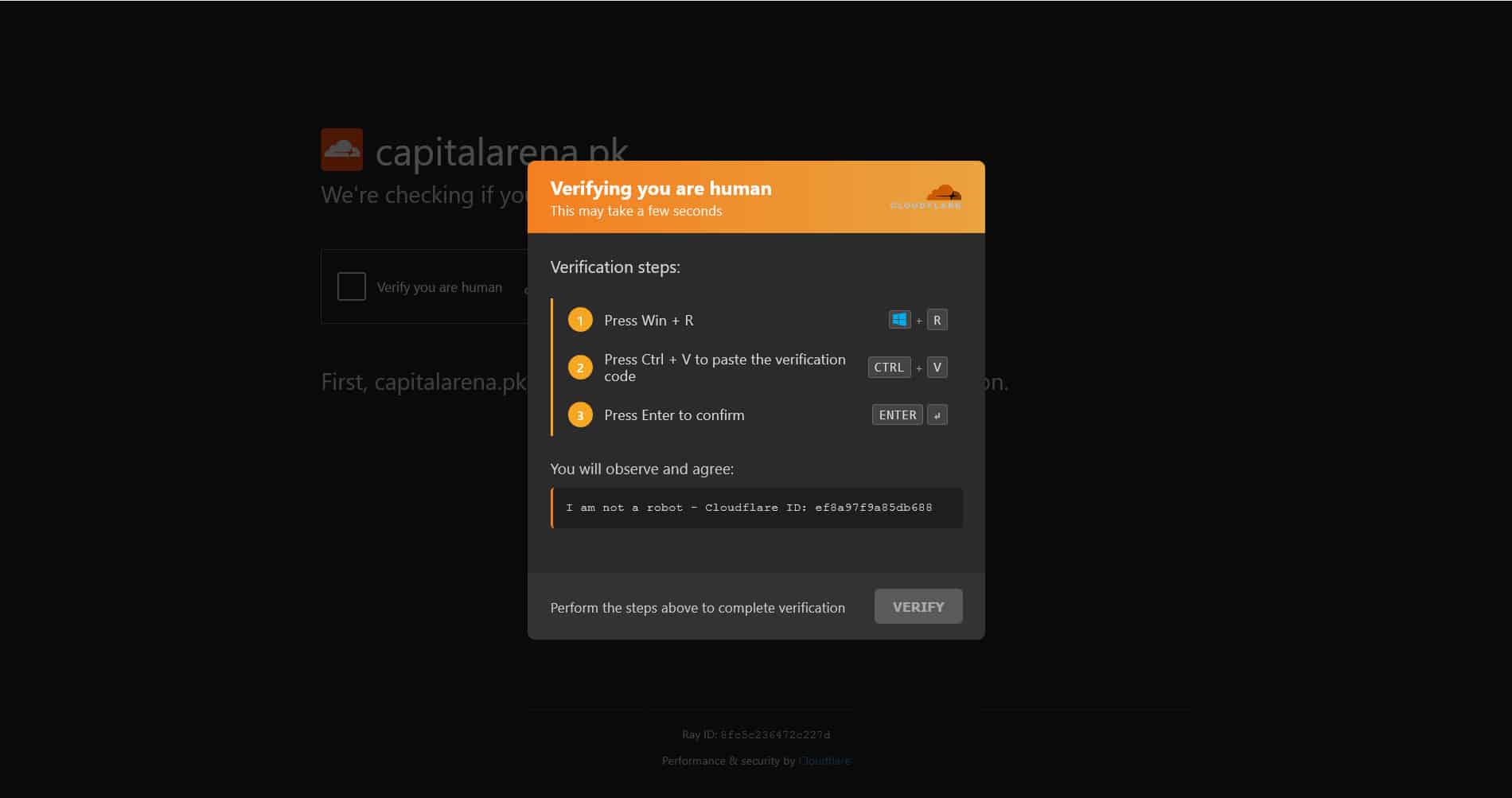
Pakistani websites have been compromised by a new malware campaign that tricks visitors into infecting their own computers.
The attack displays what appears to be a verification prompt and convinces users to copy and paste a command into Windows. Once the command is run, it silently downloads and installs malicious software that can give attackers control of the infected PC.
Users are warned not to copy and paste any commands into Windows unless they fully understand what the command does. While the attack imitates legitimate security checks, it is actually designed to install malware.
The malware campaign targets compromised Pakistani websites. Instead of showing normal website content, visitors are presented with a fake verification page that closely resembles legitimate internet security services such as Cloudflare.
The page tells users to copy a piece of code and paste it into Windows. While it may appear to be a harmless verification step, running the command starts a hidden PowerShell process, which is a built-in Windows tool used to automate tasks.
The command is designed to hide what it is doing from the user while downloading a malicious program from a remote server.
Once executed, the command performs several actions automatically.
First, it opens PowerShell in the background, so no window is visible. It then disables Windows’ normal restrictions that are meant to prevent unknown scripts from running.
Next, the command contacts the following domain: “cdn-18ee8b.cloudflareinsight.com”
Although the name is designed to resemble Cloudflare’s legitimate services, it is a different domain and should not be confused with the real Cloudflare infrastructure.
The command downloads a file named 0acb67fa.exe into Windows’ temporary folder. It then removes information that tells Windows the file came from the internet. This helps reduce security warnings that users would normally see before opening downloaded files.
Finally, it immediately launches the downloaded program, allowing the malware to begin running on the computer.
Security researchers also noted that the command slightly disguises part of its code by splitting the word “DownloadFile” into two pieces. This is a simple trick used to make the malware harder for some security tools to detect.
Because the malware is downloaded and executed automatically, victims may not realize their computer has been infected.
An attacker who gains control of the system could potentially steal saved passwords, banking information, personal files, or install additional malware. Since the infection runs silently in the background, users may not notice anything unusual until sensitive information has already been compromised.
The attack is especially dangerous because it relies on social engineering, tricking users into infecting themselves instead of exploiting a software flaw.
Anyone who copied and executed the command should disconnect the affected computer from the internet immediately. Users should avoid logging into email accounts, online banking, social media, or work services from that device until it has been checked for malware.
Here is what users need to do:
The following indicators can tell you if your system has been compromised
Users are advised to avoid copying or running commands from websites, even if they appear to be legitimate verification pages. Genuine websites rarely require visitors to manually paste commands into Windows to verify they are human. When such requests appear, they should be treated as highly suspicious.
Get the latest tech news, telecom insights, and product launches wherever you prefer.
Add ProPakistani to Preferred Sources and see more of our stories in Google Search and Top Stories.