
Xiaomi has open-sourced MiMo Code V0.1.0, a new terminal-based AI coding assistant built for long-running software projects. This means it is completely free for anyone to download and use for themselves.
The tool solves a major problem commonly found with such AI coding assistants: it can actually remember earlier decisions and context as a project becomes longer and more complex.
It also beats Claude Code in coding benchmarks.
MiMo Code builds on Xiaomi’s MiMo model family, which started with MiMo-7B, the company’s first open-source reasoning and coding model. Unlike MiMo-7B, MiMo Code is not just a model. It is a complete coding agent that runs from the terminal and is meant to help developers work across larger software tasks.
Open-Source Setup
MiMo Code is based on the open-source OpenCode project and has been released under the MIT license. This means developers can use, modify, and build on the tool.
The assistant includes free access to MiMo-V2.5, Xiaomi’s latest multimodal AI model. Users can also connect MiMo Code to third-party services such as DeepSeek, Kimi, and GLM if they want to use another backend.
Persistent Memory
One of the main features of MiMo Code is its persistent memory system.
Most AI coding tools rely heavily on the model’s active context window. Once that window fills up, the assistant can begin losing earlier decisions, conversations, or project details.
MiMo Code uses a dedicated background subagent to manage and store context while the user works. When the active conversation gets close to its limit, the subagent automatically condenses the work into a structured summary.
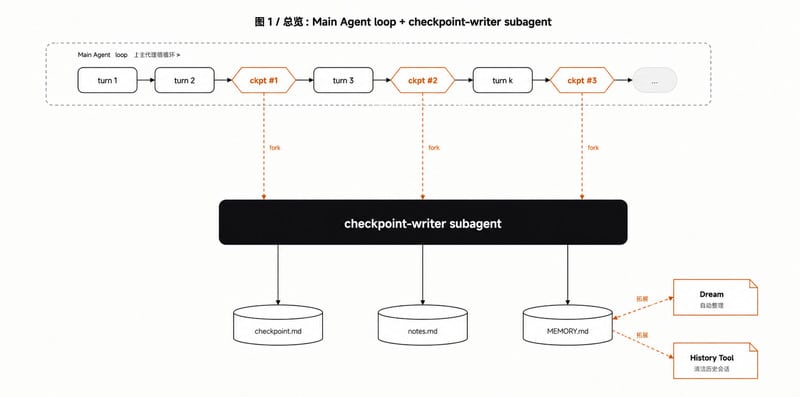
This allows the main coding agent to continue working without losing important context from earlier in the session.
MiMo Code also includes a feature called /dream, which runs automatically every seven days. It launches a separate maintenance agent that reviews old sessions and memory files, removes duplicate information, checks file paths, and compresses everything into an updated long-term memory store.
Compose Mode
MiMo Code also adds a dedicated Harness system built specifically for MiMo models.
Instead of treating the AI model as a basic API endpoint, Harness is designed to use the model’s capabilities more directly.
The tool also includes Compose mode, which can be activated by pressing the Tab key. With this mode, users can provide a rough idea or project goal, and the agent will try to handle the wider workflow.
That workflow can include planning, design, coding, testing, and review.
Xiaomi says this approach can produce what it calls an “industrial-grade finished product.”
Beats Claude Code
The company also points to benchmark results, saying MiMo Code scored 62% on SWE-Bench Pro and 73% on Terminal Bench 2. According to Xiaomi, those results put MiMo Code around five percentage points ahead of Claude Code while using the same underlying base model.
Voice Input
MiMo Code also includes built-in voice input powered by MiMo-V2.5-ASR.
Users can dictate commands, correct typos, or trigger actions such as “send” and “execute” without typing them manually.
How to Install
Xiaomi says MiMo Code is simple to set up. On macOS and Linux, installation requires a single terminal command. Windows users can install it through npm.
After installation, users can launch the assistant by typing mimo in the terminal.
The first setup process guides users through model configuration. Xiaomi says the free MiMo-V2.5 channel can be used without creating an account or completing registration.
Why It Matters
MiMo Code gives Xiaomi a full developer-facing AI tool, not just an AI model.
Its main focus is long-term coding work, where memory, context management, planning, and multi-step execution matter more than simple code completion.
By open-sourcing MiMo Code under the MIT license and offering free access to MiMo-V2.5, Xiaomi is positioning the tool as a developer-friendly coding assistant for users seeking a terminal-based workflow and greater control over the AI backend.
Stay Connected with ProPakistani
Get the latest tech news, telecom insights, and product launches wherever you prefer.
Add ProPakistani to Preferred Sources and see more of our stories in Google Search and Top Stories.












