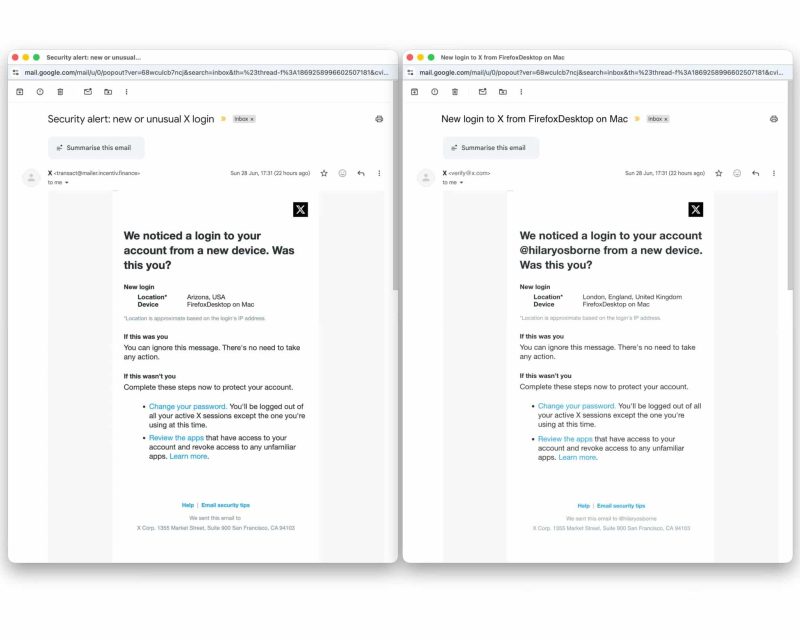
Scammers are sending fake X login alert emails that look almost identical to real security notifications from the platform.
The emails warn users that someone has logged into their X account from a new device and location. In one example, the message claims the login came from Arizona using Firefox Desktop on Mac, even though the user lives in London. The email then urges the user to change their password and review connected apps.
The scam works because the advice in the email sounds legitimate.
X does recommend changing passwords, reviewing connected apps, and logging out of unfamiliar sessions when an account may be at risk. However, in the fake emails, the password reset and app review links do not go to X. Instead, they send users to fraudulent pages designed to steal login details or grant scammers access to the account.
Jake Moore, global cybersecurity adviser at ESET, said scammers want either the user’s X username and password or approval for a malicious link that can access the account without needing the password.
The fake emails closely copy real X login notifications.
They use the X logo, similar formatting, matching colors, and clean spelling and grammar. That makes them harder to detect than older phishing emails filled with obvious mistakes.
However, there are warning signs. Some fake emails do not include the user’s X handle and use vague location details. Moore said the biggest clues are the sender’s email address and the actual destination of the links.
X says it only sends emails from @X.com or @e.X.com domains.
The company also says it will never send emails with attachments and will never ask users to provide their X password by email, direct message, or reply.
Users should check both the sender address and the link destination before clicking anything. On desktop, hovering over a link can reveal where it really leads. On mobile, users should avoid tapping suspicious links and open the X app or website directly instead.
If scammers gain access to an X account, they may use it for further fraud.
That can include crypto scams, phishing attacks, misinformation campaigns, or attempts to trick the account holder’s followers.
Attackers may also try to connect malicious third-party apps to the account, allowing them to keep access even after the user changes their password.
Users who receive a suspicious X login email should not click the links inside it.
Instead, they should open the official X app or type X.com directly into the browser and check account security settings from there. Moore said users should not panic and should verify security alerts inside the genuine app.
If a user only opened a suspicious page but did not enter any details, they are likely safe. However, if they entered a password or one-time code, they should change their password immediately, enable two-factor authentication, and review connected apps.
X also advises users who suspect account compromise to revoke access for third-party apps they do not recognize.
The scam shows how phishing attacks are becoming more convincing. The safest response to any unexpected login alert is to avoid email links and check the account directly through the official app or website.
Get the latest tech news, telecom insights, and product launches wherever you prefer.
Add ProPakistani to Preferred Sources and see more of our stories in Google Search and Top Stories.