Guest Post by Shahid Saeed
Automotive Navigation Systems have become extremely popular all over the world today. These devices are used extensively in major cities around the globe; by everyday people, taxi drivers and people new a the city or town. The bigger the city, the more the need for a navigation system is. Sadly, we Pakistanis have long been deprived of this technology but finally we have working SatNav in Pakistan.
Improper urban planning, lack of technical infrastructure and lack of voluntary efforts are the three main reasons SatNav has remained ineffective for Pakistan. While major companies are not keen in investing here keeping in mind the not so high revenue they would generate, the people have themselves not created maps for themselves because they want everything for free or others to do such things for themselves.
The biggest player in satellite navigation today, Garmin and TomTom have not developed any maps for Pakistan. They don’t see a reason why they should do so. But they have been gracious enough to provide software (and people have developed even better ones) to create maps capable of running on their GPS devices. A bunch of volunteers have dedicated huge time in creating maps for many cities of Pakistan and I’ll be explaining the extent to which these maps are effective later on.
Free Online Maps
The two biggest names in community created online free for all maps are OpenStreetMap and Google MapMaker. The main difference between the two is that OpenStreetMap provides its map data under a Creative Commons license while any maps created by users of Google Map Maker are the intellectual property of Google. Both are community created and with time both maps have been quite developed. For cities like Islamabad and Karachi, they present a very high detail and therefore are a success for the online community. Google has promised that with time it will verify the integrity of the created maps and then export them to Google Maps.
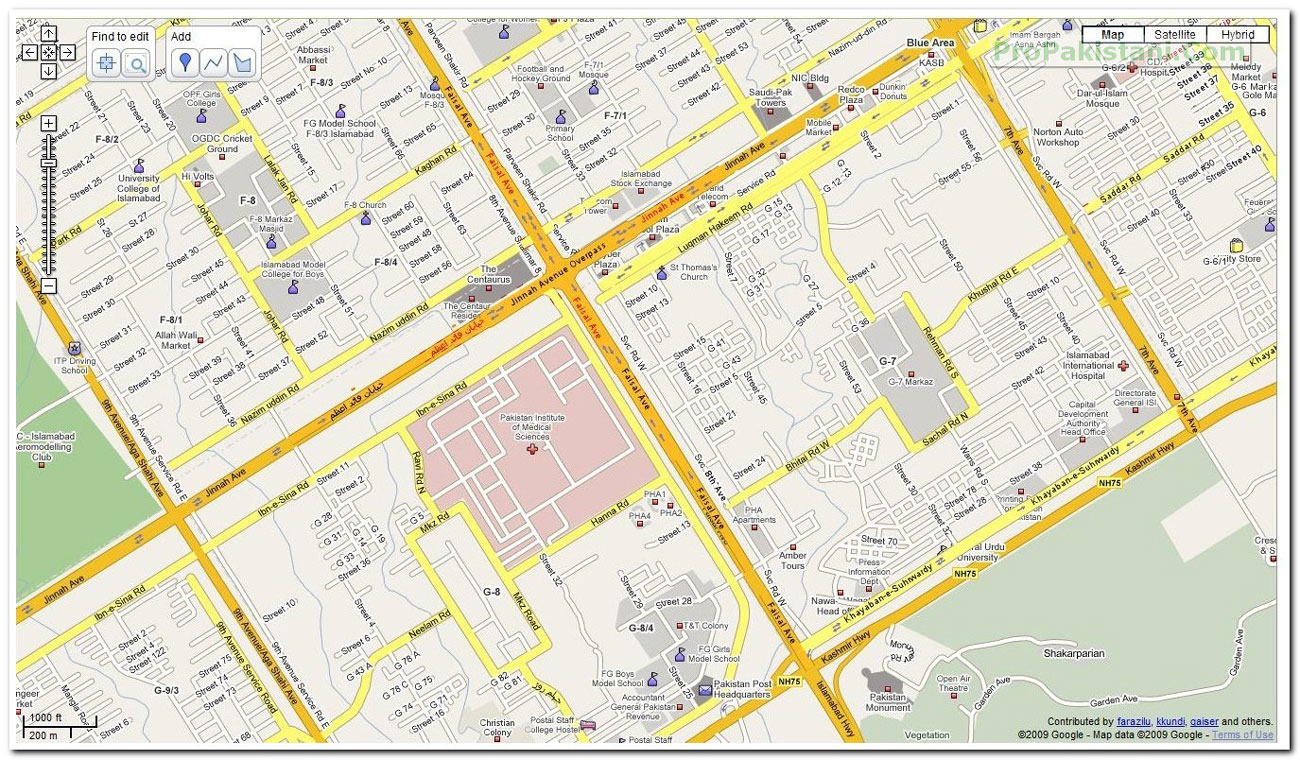
A comparison between the two (PIMS – Jinnah Avenue Interchange, Islamabad) :
Google MapMaker (Click on Image to View Full Size):
OpenStreetMap (Click on Image to View Full Size):
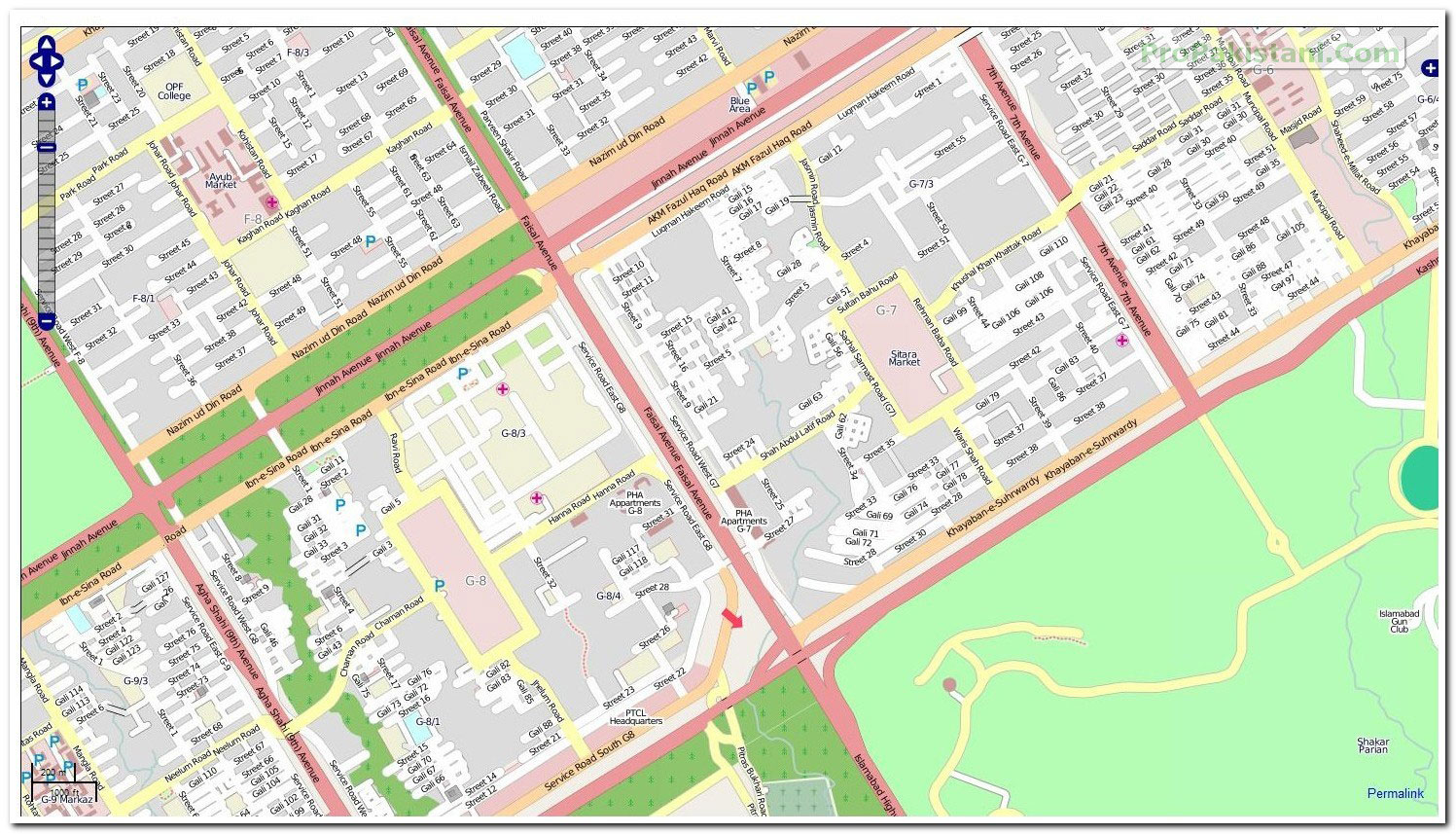
The level of detail as seen in the above pictures is quite satisfactory for pre-departure route planning.
Garmin Maps (Provided by http://pkmaps.freeforums.org/)
A bunch of what I can assume are GPS enthusiasts have worked hard to develop these Garmin compatible maps. Using free software available over the Internet, they have worked tirelessly to create maps for Islamabad, Lahore, Karachi, Peshawar and Wah Cantt. Indexed (means address searchable) versions are also available. The forum encourages open source map creation and does not allow discussion about cracking/unlocking premium maps available for the region.
Using maps provided by these angels, I have been able to install a perfectly working Garmin Mobile XT. The GPS chip in my Nokia E71 is of course not the greatest, and I am able to lock my location in a minimum of 13m radius, which is of course very negotiable.
A-GPS (Assisted GPS), which primarily works by locating your position roughly by comparing your cell site on the cellular network to an existing databese of these cells/towers and thus triangulate you, is of course of hardly any use. The maps developed by these chaps provide a very good detail and make navigation for an unfamiliar person at least easy (of course the address in hand would be 3rd house on the right, after the second turn under the Pine Tree).
The setup demonstrated below using a Nokia E71 and Garmin Mobile XT.
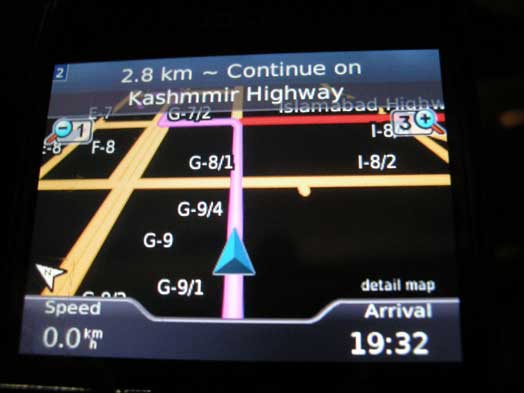
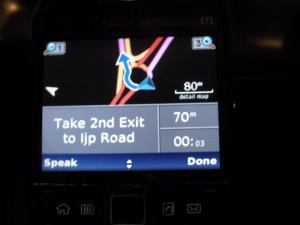
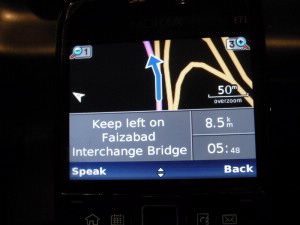
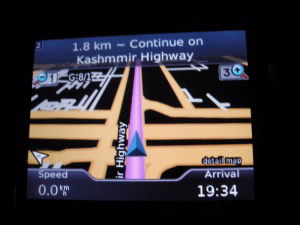
Garmin’s software was of course cracked using a keygen, but the maps provided by pkmaps are free to distribute. The onboard GPS has provided me continuously with even 8m lock. The pictures above demonstrate a drive from my home in Rawalpindi to Jinnah Super Market in Islamabad. The maps were of course not up to date, but will provide a relief to somebody new in the city. I am working on improving the Rawalpindi section of the twin city maps, and with even more volunteers we can create a very very detailed navigation map.
Naqsha.net
This was Pakistan’s first interactive map website. They provide two different online versions of their maps. One uses overlayed layers on Google Maps while the interactive maps utilize Adobe SVG Viewer to provide very good street level maps of all major cities of the country. The interactive maps also allow a user to plan a route quite easily. The same intersection is shown in Naqsha.net’s hybrid viewer below :
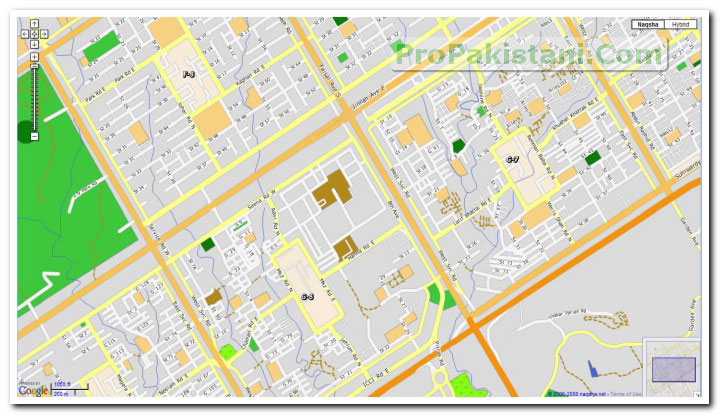
The best thing is that they provide excellent routing capabilities and the fastest or shortest distance calculations it does are indeed the ones anybody would use keeping either criteria in his/her mind.
Naqsha.net also provides maps for Garmin devices, and many people have utilized their maps.
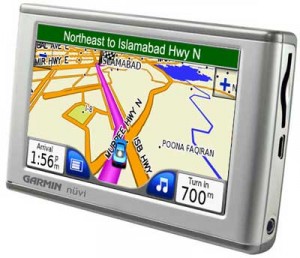 Naqsha.net has teamed up with Tracking world to provide Garmin SatNav units preloaded with maps.In-car GPS navigation is not available in Pakistan. The unit provided range from in-car dash mounted devices to devices for motorbikes. There is also a unit which can be integrated with the vehicle’s DVD/entertainment unit and displays the navigational information on it.Existing Garmin users also have the option to buy the map for their specific unit.
The map has street level detail of major Pakistani cities and all major national highways. Streets are labeled and searchable for Islamabad, Lahore and some parts of Karachi. In addition there are close to 40,000 POIs such as fuel/CNG stations, banks, ATMs, hospitals, restaurants (categorised), hotels, shops, etc. Most POIs have address and phone number information available as well. Units equipped with FM transmitters and Bluetooth allow hands free dialing from the unit and are able to integrate with the vehicles’s audio system as well.
The current base unit, Garmin Nuvi 200w, retails for Rs. 29,750. If you are in Lahore, visit the display centre at Tracking World (Pvt) Ltd. For people in Islamabad units are on display at Hi Volts (F-8 Markaz) and Illusions (F-7 Markaz). You may also call at 042-111-22-66-66 for details.
Trakker Group
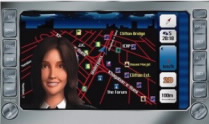 Like Naqsha.net they also claim to be the first to introduce SatNav in Pakistan. Trakker Group provides car tracking for personal or commercial use. They stepped into sat nav couple of years back.
The in car SatNav provided by Trakker has extensive maps for Karachi District. The very small number of customers who have used their service are extremely satisfied with their product as it has very good routing capabilities. The problem remains the maps being limited to Karachi as of now. The system provided with them has DVD playback and other benefits as well but is very costly.




























hi there this is good. if any one want to contribute to create map of his own city. like i live in wah and i want to make a map and also want to show this map on navigation device. how i make map.
i create full navigational maps.
Salam Muneeb,
I purchased my nuvi715 some time ago preloaded with GCC and Europe maps. My eager was to buy my own country’s map where I am not so familiar with the streets. Is there any compatible version available for this device as the Garmin don’t seem to have one. Thanks in advance
Abdul Quddus
i need your help kindly mail me
i need gps waypoints for k2 Concordia trek. can anyone help. it need to be used on a gps watch form garmin fenix 5x
Dear Mr Munib,
its been 9 years to this thread.. i was wondering if now, there is a way to add karachi city map to my garmin 2595? if not, then is there any other app for my iphone that does not eat cellular data when on the road?
thanks!
hello sir Atif,
do you have map of a car gps .
I need a gps map of pakistan to install in my car gps.
Please advise.
Sheik
[email protected]
03008223140
You can create a free login with http://www.openstreetmap.org/ or http://www.google.com/mapmaker and zoom in to your area, e.g. Wah. It will show u satellite imagery of your area in the background and gives you tools to draw roads and areas and add names/descriptions for what u draw.
If you have a GPS device, u can upload your track files directly into these websites as well.
Salam , first thanks for an informative post , which version of Garmin you are using on E71 , I tried the version 5 meant for 5800 but it’s asking for external GPS
I’m using 4.10. It’s the one I could find cracked over the Internet.
You need to go to Settings -> System -> Remote GPS
Disable bluetooth GPS and enable Assisted/Built in GPS
dear Farhan plz guide me how to download detail map on my nokia5800
E71 has A-GPS not in-built GPS. Look at the following links for details:
http://www.wmexperts.com/articles/gps_vs_agps_a_quick_tutorial.html
http://europe.nokia.com/find-products/devices/nokia-e71/specifications
A-GPS services to my knowledge are not available currently in Pakistan
The difference between A-GPS and on-board GPS confuses a lot of people.
E-71 shipped to North America (E71-1) has A-GPS because it is as useful as on-board GPS in that region.
I’m using Portugese language E71 (E71-3). This has an onboard GPS chip.
Another thing, newer built in GPS chips also take advantage of Assisted GPS. Older chips didn’t have that advantage.
Basically, it will use GPS when you’re on streets,open spaces and will use A-GPS to get a better lock when you’re inside buildings, tunnels etc.
I was wrong earlier. the E71-1 also has the same GPS chip. It calculates using the GPS satellites and as A-GPS support as well
Thanks Shahid , to answer the question of A-GPS on E71 , Assisted GPS used the Cell Tower locations to triangulate your position along with the GPS chip , this results in a faster GPS location fix as compared to regular GPS . Since N95-8gb ( not sure about N95 ) A-GPS is a standard feature on all Nokia phones .
how to download the map on nokia 5800 express music??????
I recently installed Nav4All on my Windows 5.0 Mobile (IMate KJAM) and using a blue tooth GPS Receiver with it. so any body have idea , how to import or convert these maps for Nave4All software.
What map format does your software require ?
Pakistan is still better then middle east on Google o ropenstreetmap, try to compare Riyadh to Islamabad, there are 3rd party maps avail able but not as open as in USA/EU. There is some govt polices also involve
Shahid Thanks ,I’ve got Garmin working on my E71 , the maps are working fine with instructions , distances and turn reminders kudos to the PK Maps team
Hi farhan
Am new to E71 GPS .Can you please direct me how to install garmin 4.1 and from where i can get pakistan maps
Downloaded garmin 4.1(along with keygen)but unable to install it .
hey Farhan!
i’ll be needing a bit of ur time….. i just came back to Pak after long long time and Masha Allah things ave changed here i just figured we can use GPS here now… i got E71 aswell i ave Garmin map for ISB its working perfectly fine… but i need map fol lahore and Rawalpindi, am just wondering if you happen to have any of these? plus brother ill also be needing your support to upload them cause u see am not at all a computer guy so have no idea how to upload them in my mobile…. so plz help if u can…
Best Regards,
Rayan
Go to the freemaps forums in the post. Download all the maps and use this software to integrate the maps
http://pkmaps.freeforums.org/gmaptool-t12.html
Copy this maps to the Garmin folder in your memory card/phone memory and you’re all set
i have E-90 nokia and i wanna use maps on my cell plz tell me about it.
thanks
[email protected]
@ Awais , first check if you have an exe file or the whole folder , if EXE file run the setup while keeping the phone in mass storage mode and if you get folder with files copy the contect to your memory card
I’ve done a step by step from here at my blog
http://senseapplied.com/index.php/routable-maps-of-karachi-on-nokia-e71/
Is there any map cd or free download available for vetz car navigation system (gps)
[email protected]
plz tell me is nokia E-90 have assisted/built in GPS ?? i have install GARMIN but i m facing some problem. can any one help me.
thanks
[email protected]
plz mail me (if u can)
Zeeshan , I’ve also installed Garmin in Nokia E90 , the process is just like E71 , from our previous correspondence , you have successfully installed Garmmin , you have the card code generated and your se.unl file is also correct , copy the maps and se.unl file in E:\garmin ( memory card) , restart the program if already running , Go to Tools , Settings , Remote GPS , here you will find two options Use Bluetooth GPs and USe attached GPs , choose Attached GPS and in a moment or two it will start working , you will see a green bar on the top right hand corner .
If you are not getting the GPs option , recheck your card number at About option , regenerate the code and again make the se.unl file Inshallah it will work
dear all i need the map of pakistan for MIO c320 and how can i install it ..on my device (its with Memory card also with preloaded GCC and europe map )
regards
nayyar
Hi shahid / farhan
please guide me if i can use GPS on Black Berry 8320 in pakistan. i am in canada right now on vacations i am looking for GPs device here but if it will work on my BB device i will vhange the plan….plz update urgent
I’ve installed Garmin on my Nokia N79 and it works perfectly well. How do I get Voice commands/instructions to work.
@ bilal , Sorry have no clue about BB , never used one , never touched one
@ Kamran I got mine from the installation I got off the net,
I’ve uploaded the American English file at
http://rapidshare.com/files/221577156/English_American_.vpm
copy it in E:/GArmin /Voice folder and you’ll be all set
I have installed the garmin mobile TX and is now unlocked.
However the problem i am having is that when i put the map in e:\Garmin i is not recognized by the software. As such the map is not being displayed.
If any one can please update and help me with this… i’m using this on the nokia 5800.
[email protected]
Help is and will always be highly appreciated. Looking forward for a reply.
Hi,
I have Tomtom GPS device but I would like to add Pakistan maps into it. Is there any way, I can get maps for it?
Thanks
Regards,
Haider
Gulf E-Solutions
http://www.gulfesolutions.com
Naqsha.net’s retail price reflects the minimum amount at which they can continue to make these maps better and to put food on the tables of 15 families whose bread-winners work tirelessly at naqsha.net. If you cannot afford Rs. 10,000 for legitimate maps of all of Pakistan, please contact naqsha.net for non-profit and charity pricing. Please realize that, after 60 years, a Pakistani company has shown incredible courage against all odds – a society that rewards dishonesty and a government that is thoroughly corrupt – to do something good for this country. Instead of paying those who are working hard to produce these maps, people are discussing here how they can cheat and steal. Please don’t join these criminals in promoting and rewarding this robbery. You would be stealing from the mouths of children whose parents work at naqsha.net. Please buy your maps directly from naqsha.net and do your duty as responsible citizens of a developing country that needs honesty and hard work. You would not only have the satisfaction of doing the right thing, you would also get map updates and be able to make your own suggestions for improvements. Naqsha.net is doing something good for this country by hiring Pakistanis in decent jobs to produce badly-needed quality maps. Please support this effort rather than sabotage it. NOTE: Data Solutions (Private) Limited is the sole owner and copyright holder of naqsha.net maps and website.
Data Solution, you are right. If people in PK can afford a burger for Rs.500 and can drive some 1500k shit cars w/o airbags and abs, should not care about 10k maps.
Dear brother i want to make digital map like used above in garmin device (not in openstreet or google map maker).
so i need a software that i can use to make such map.
can you help me where i can find such a software.
i have hp ipaq pda hx2750
i have used tomtom navigator abroad
now in pakistan its uselss because i dont have any maps for pakistan
can any one advise me how i can utilise my equipment so it works to get arround easily in pakistan
please advise urgently
thanks guys
Salam , first thanks for an informative post , which version of Garmin you are using on E71 , I tried the version 5 meant for 5800 but it’s asking for external GPS
i really like it
i enjoyed it very much
Salam , first thanks for an informative post , which version of Garmin you are using on E71 , I tried the version 5 meant for 5800 but it’s asking for external GPS
i really like it
i enjoyed it very much 03216451873 i hope
Reply
alam , first thanks for an informative post , which version of Garmin you are using on E71 , I tried the version 5 meant for 5800 but it’s asking for external GPS
i really like it
i enjoyed it very much 03216451873 i
I want to use mobile Navigation, i think last month i ready about it in news and two companies was louched Mobilink and U-fone. If any one use it. So,which one is better….
Hi,
My problem is i have an O2 Orbit aret200 smaprtphone/pocket pc with built in GPS. Previously i had been using tomtom in uk but i was wondering if someone or you could help me out in getting GPS software for use in Karachi, Lahore and Islamabad, Pakistan (wat software and installation). Kindly let me know wat website too. Thanks. I would be much obliged.
Cheers.
AOA,
ill b gr8full if u plx tell me how to install garmin on ma E71 i bought it from pakistan under MZ warranty
ill b thankfull to have ur help
SHARYAR
Hi,
I’m having problems with using Garmin on my Nokia E72. It ocassionally hangs up.
Previously on E71 it was working alright.
Any ideas how to run it on E72?
Thanks,
Farrukh
can i use this progrm on my Nokia5320?
how , where and what shud i download to my nokia 5230 (same GPS specs as Nokia E71) to get driving directions in lahore? (please provide link of website to download as well.)
I have a chinees gps device, it come with igo8 and UAE maps, can any one guide how can i get map of pakistan, or can i use garmin software on it ( it is windows CE based)
Thanks
I hope your problem has been solved.
Any way you can download Garmin Mobile XT and inetegrate Pakistani Maps with it.
Windows CE supports Garmin Mobile XT.
Melissa
please tell me how to download detail map of pakistan on nokia5800xpess music
Is it possible to give me the complete map for my GPS.
Regards
Imran yousaf
+92 333 5282858
for free mobile navigation software visit the link below
http://mobile-navigator.blogspot.com/
I need a help. Can someone tell me how can i install any navigation map on my Nokia N900 phone? Earlier i used Mobitrack on my BB but my current 8520 model does not have GPS. Pls help.
A remarkable presentation merits a comment. I am impressed. On to the next…
iam using nokia 5230 so please could you send garmin maps for nokia 5230 and as well as the procudere of downloading into my mobile.
Thanks
did u use that mobile garmin xt app with your gprs on? Or with the gps signals?
Can some please tell me whether i can use Garmin XT on samsung wave S-5333 or not???
Hi Guys
I just bought a corolla. Did a lot of research about sat nav and got the dash changed and got the corlloa touch screen with sat nav. it cost me 24k. it has navitel software. the same thing with trackerworld was 40k. problem is i cant enter address manually in mine but all roads show names etc? Can i put in a sd card of another map company? will it work? where can i get it?
thanks
I have n73. I want a software to use as gps that do not use internet.
download free garmin pakistan map
Greetings.
I am ready to buy a car navigation unit – please advise what in your opinion is the best on the market.
I am in Islamabad.
Thanks
Imran
Salam to everyone!
actually i have bought my garmin gps NUVI 40LM from America…..so please any body guide me that how i can enter detail map in my gps so that i can use it in lahore city of pakistan….
i will look forward for your guidance….thanks
I have a Gps Car Navigation System but could not access Pakistani Map. would any body let me know how can i get latest pakistani map for GPS Navigation
bro i need pakistans map for igo 8 plz help
hey buddy you are wrong
the Maps company named Sygic has developed a complete map for Pakistan which is powered by TOMTOM, i my self using Sygic for a year. it is quite offline maps no need of the internet. it provide complete step by step navigation. Only thicg is its a $20 mobile phone application available for iOS and Android Smart Phones
Uh, did you READ the date of this article?? 2009!! Thats only 1-2 years after the introduction of android! There was NO sygic back then ! Stupid…
bro i have tomtom go 700 can u guide me for installation of pakistan map in it will be gratful regards
DEAR SIR,
I HAVE IMPORTED CAR FROM JAPAN WHICH IS HAVING DVD PLAYER OF GATHERS COMPANY MODEL VXM-118VS. TRYING TO RUN GPS NAVIGATION SYSTEMS BUT REQUIRED MAPCODE OF PAKISTAN. COULD YOU PLEASE SUPPORT ME TO FINDOUT THE SOLUTIONS.
RGDS
BASHIR
[email protected]