
There are several methods to check whether you’re blocked on WhatsApp, but they are either not fully reliable or require you to message the contact.
A new, more reliable method allows WhatsApp users to use the app’s encryption-verification feature to check whether someone may have blocked them without sending a message.
The method is more discreet than calling or messaging the contact because the other person does not receive a notification when the check is performed.
However, WhatsApp has not officially confirmed encryption verification as a blocking detector, so the result should not be treated as absolute proof.
Usual Signs of a Block
Users commonly look for several signs when they suspect that someone has blocked them. These include a missing profile photo, messages remaining on one check mark, and WhatsApp calls failing to connect.
However, none of these signs is conclusive.
A person may have removed their profile photo, changed their privacy settings, or moved to a new phone without syncing their contacts. These changes can produce similar results without a block.
New Encryption Check
WhatsApp’s automatic encryption-verification feature may provide a stronger indication.
Every private chat uses its own encryption keys. These keys can change when someone reinstalls WhatsApp, moves to another phone, or connects an additional device.
WhatsApp allows users to verify that a conversation remains protected through the Encryption option in the contact information screen.
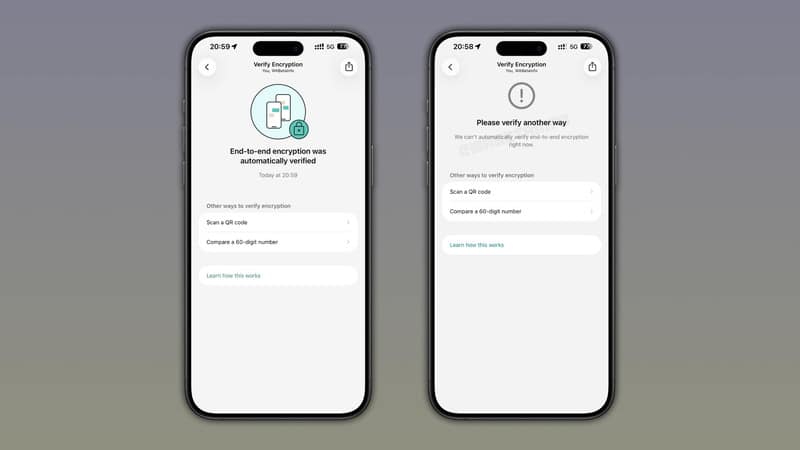
When someone has blocked a user, automatic verification may repeatedly fail for that specific conversation.
The failure does not disable end-to-end encryption or necessarily indicate a security problem. It may instead occur because WhatsApp cannot complete the automatic verification for that chat.
How Verification Works
WhatsApp previously required both participants to compare a 60-digit security code or scan a QR code.
The company introduced automatic security-code verification in 2023 to make the process easier.
Users can now open the encryption screen and allow WhatsApp to verify the conversation automatically without asking the other participant to compare codes.
How to Check
Open the WhatsApp conversation with the contact. Tap the person’s name at the top of the screen to open the chat information page.
Select Encryption and wait several seconds while WhatsApp attempts to complete the automatic check. If the verification finishes successfully, the contact has probably not blocked you.
If WhatsApp repeatedly says that it cannot verify the encryption automatically and asks you to use another method, the contact may have blocked you.
Not An Official Method
WhatsApp has not officially presented this process as a way to detect blocking.
Automatic verification may also fail because of connection problems, recent encryption-key changes, or other technical issues.
Users can test the behavior in a conversation where they already know the other person has blocked them. In such cases, the automatic check reportedly continues to fail.
WhatsApp could change how automatic verification works in a future update, which may prevent the method from working.
Stay Connected with ProPakistani
Get the latest tech news, telecom insights, and product launches wherever you prefer.
Add ProPakistani to Preferred Sources and see more of our stories in Google Search and Top Stories.












