Microsoft is gradually introducing an experimental Copilot feature that can access information about a Windows PC and explain its hardware, storage, and resource usage in simple language.
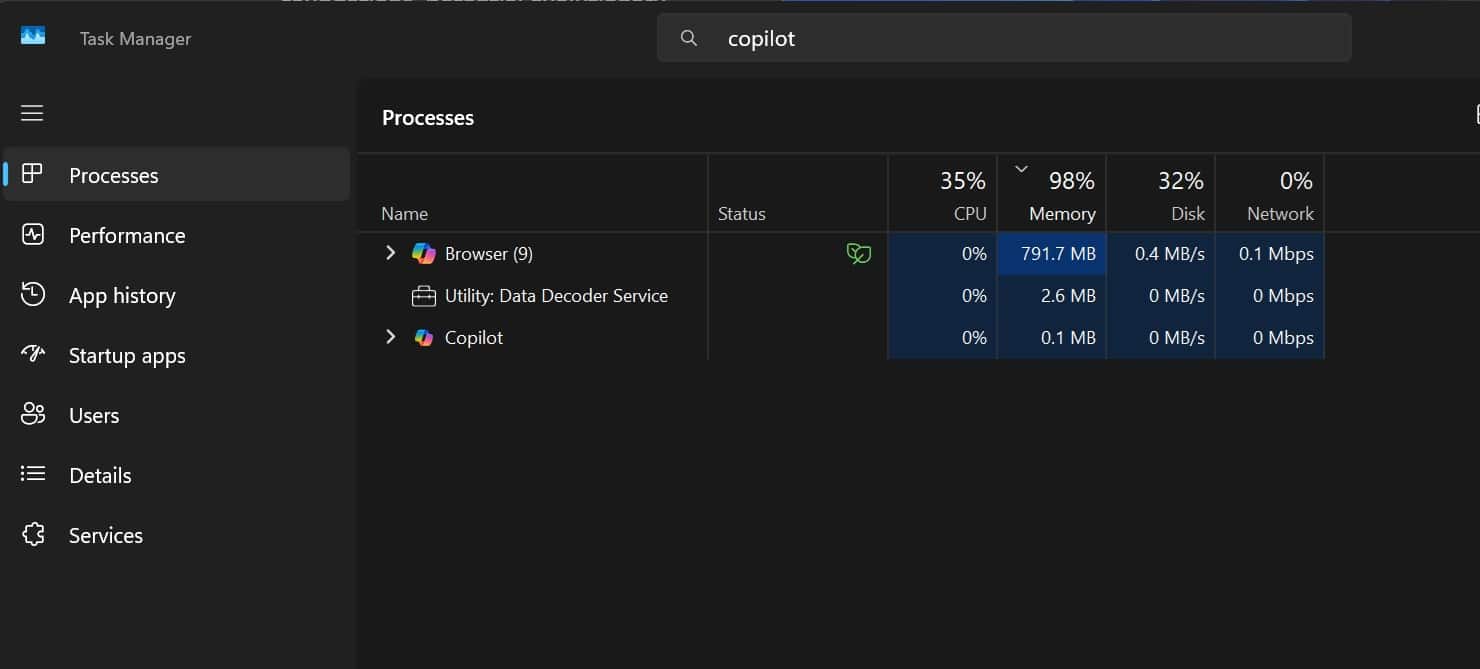
The feature, called PC Insights, can answer questions about current CPU usage, available storage, battery health, connected devices, and other system information. However, testing by Windows Latest found that the Copilot app itself can consume close to 1GB of RAM after being opened.
Copilot Can Read Your PC’s Current State
PC Insights allows users to ask Copilot questions based on the actual condition of their computer rather than relying on general information about similar hardware.
For example, users can ask what graphics card is installed, how much CPU is currently being used or whether enough storage is available for a 100GB game. Copilot retrieves the relevant system information and presents an answer without requiring the user to search through Task Manager, Settings or File Explorer.
Microsoft says the feature is being rolled out gradually and may not yet appear on every device. The company also warns that it remains experimental and may occasionally provide incomplete or inaccurate information.
What PC Insights Can Check
According to Microsoft and references examined by Windows Latest, Copilot can access information about:
- Current CPU, RAM and GPU usage
- Total and available storage
- The size of folders such as Downloads and Documents
- System specifications and BIOS information
- Battery health and antivirus status
- Connected USB devices, printers, webcams and external drives
- Wi-Fi, Bluetooth and network adapters
Copilot can also combine local information with online results. It could, for example, compare the storage remaining on a PC with the installation requirements of a game and explain whether more space is needed.
Permission Is Required
Microsoft says PC Insights is optional and cannot access system or file information until the user grants permission.
Users can allow access for the current session, permanently approve similar requests or reject access. A session lasts until the Copilot app is closed or the computer is restarted.
Permissions can later be changed or removed through Copilot’s privacy settings. Microsoft says the feature does not continuously monitor a computer in the background.
Personal Files Are Not Used for AI Training
Microsoft says personal files and system information accessed through PC Insights are not stored or used to train its AI models.
However, conversation activity, including prompts and Copilot’s responses, may be used to improve or train AI systems depending on the user’s settings.
The feature does not automatically receive unrestricted access to all files. Microsoft says it only retrieves the information needed to answer a specific question after receiving permission.
Copilot Uses Significant RAM Itself
The new feature has drawn attention because the Copilot app can itself consume a considerable amount of system memory.
Windows Latest observed Copilot using around 800MB and approaching 1GB of RAM after the app was opened on a computer with 32GB of memory. The outlet reported that this occurred while the app was otherwise idle.
This is one test on a particular system, so memory usage may vary depending on the computer, app version, and activity. Microsoft has not published an official figure for Copilot’s typical RAM consumption.
Copilot Now Includes Its Own Browser
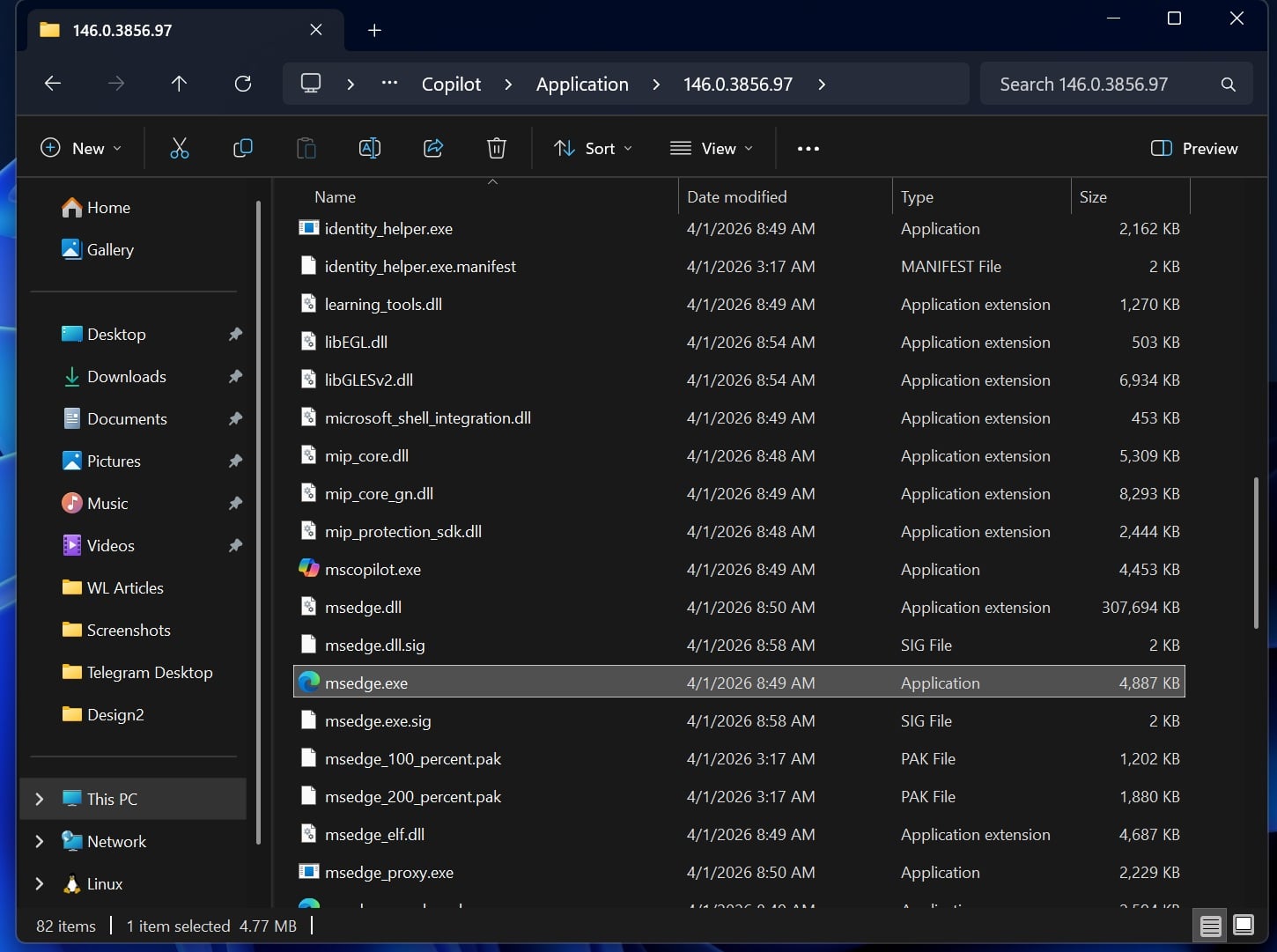
Windows Latest also found that the latest Copilot app is again based heavily on web technology and includes a separate copy of Microsoft Edge.
The installation folder reportedly contains the Edge executable and other Chromium components used to support Copilot’s built-in browsing functions. The app may consequently appear as both “Copilot” and “Browser” inside Task Manager.
Microsoft previously offered a native Copilot app built using Windows UI technology. The latest version has moved back toward a web-based structure as the company adds browsing and other online features.
PC Insights could make basic system information easier to understand, particularly for users unfamiliar with Windows diagnostic tools. However, Copilot’s own resource consumption may draw criticism as Microsoft positions it as a tool for understanding PC performance.
Copilot Cannot Fix Problems Yet
PC Insights currently operates with read-only access.
It can explain system information and suggest possible actions, but it cannot change Windows settings, remove files, run troubleshooting procedures, or automatically fix performance problems.
Microsoft says Copilot may guide users through possible solutions, but the user must carry out any changes manually.
Stay Connected with ProPakistani
Get the latest tech news, telecom insights, and product launches wherever you prefer.
Add ProPakistani to Preferred Sources and see more of our stories in Google Search and Top Stories.