A friend shared a nice site with me, that can actually send you SMS notification for each incoming email. 
Site is pushinbox.com- with this website, you can configure your mobile number to get email notifications on your cell phone – and yes, this service works with all cellular operators in Pakistan (self tested).
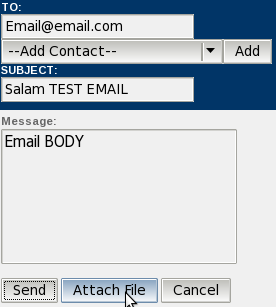
Here is the mechanism: You will be given a WAP based email client that just works like your Gmail, MSN, Yahoo or any other email service. You can use this email address to get emails – which will be also sent as SMS message over your cell phone. Yes, all cellular networks in Pakistan are supported (self tested).
As mentioned above, as soon as you will receive emails in pushinbox.com, an SMS alert will be sent over you phone.
Now, if you don’t want to give up your Gmail, MSN, Yahoo or your corporate email id, then do this – forward your emails to your pushinbox.com, and that’s it. You will be notified about emails that arrive in your Gmail, MSN or Yahoo.
But before that, sign up at pushinbox.com along with your cell number to start going. Also note that you can use your pushinbox.com as your primary mobile email service, it offers attachments and many other cool features.
Note: It won’t display your email, instead it will notify you that an email has been sent from [email protected], and a link to your email – that can be accessed using GPRS. This way, you can check email on phone – or in case its not urgent, check your inbox when you are online from PC.
Also Note: Give your cell number in this format: 00923335444XXX
Tip: Using Gmail filters you can also get email alerts of only specific emails which you think are important to you.
Another Tip: If you do not have email provider with email forwarding facility then use POP3/IMAP services to gather your emails in your Gmail account and forward Gmail emails to your pushinbox.com account.
There is option in pushinbox.com to integrate your Gmail or other email accounts but they were not giving me SMS notifications but by forwarding emails to pushinbox.com account works for SMS notifications.
Enjoy and Happy Monday!






























Not working for me …. on ufone
i have tried not working on my cell (ufone), i don’t know about other operators
working for me on Ufone – are you sure that you gave your cell number in this format: 0092333XXXXXXX
Dear Aamir Attaa I’ve tried three numbers ( Warid, Zong, Telenor), it didn’t work for any number. Can you please confirm that whether this service is still available
great. i will try this today.
Thanks Attaa Bhai, works fine @ my end. you Rock! :D
Thanx Bro.
I am in Australia. The service works here as well.
didnt worked , plz help…
Nice Sharing working for me on Browser… ;-)
Thanks
nokia 6600 ka lia zong free internet settings bta dain plz.I AM ANXIUOSLY WAITING FOR UR REPLY!!!
write down sms
all nokia 600
and sent it to 131.
setting will be recived. pin code is 1234
or for further info call 310
Go to Zong sim menu\Parameters settings\Send IMEI
This is method to request MMS/GPRS/WAP settings for all handsets .
Works fine for me on Warid. Thanx for the sharing.
yar its work that’s great
Tested with Ufone, Warid, Zong. Its working and its faster than of Uconnect guys get your Uconnect deactivated now :P
I gave the number in this format 0092345xxxxxxx
But it isn’t working.
I think this is a lit bit risky your impotent emails forward to other free email servers I am not using this service!
WONDERFUL
yeah its a bit risky it has privacy issues.
Not working at all.
I checked it with different format like 00923xxxxxxxxx and with different cell phones.
But not working.
Hello,
I have gone bit confused, can you explain me step by step ???
Also i did not notice earlier & entered by mobile no. in 923XXXXXXXXX format instead of 00923XXXXXXXXX format, does it make any differance ???
Will appriciate your quick reply
No both should be fine.
worked just once
aik dafa kay bad koi mas nahi mila
kiya koi limit hai is may sms ke?
best wid warid
Salam,
it does not work with yahoo mail classic , one need to upgrade to yahoo mail plus to get advantage ..THanks
Switch to Gmail or Gawab
Its working for me too. No limit observed yet. It would have been better if subject had also been smsed in the sms alert.
working fine with Zong.
how to change the number..
because i have inserted wrong no.
Doesn’t work for me on 0092333XXXXXXX (Ufone). Why?
Salam, Maine apnay computer say site par account banay aur apna mob number 0092345XXXXXXX main likha. Main agr apnay email ([email protected]) par gmail, yahoo etc say email bhejta hu to, meray pushmail k account main to wo email aajata hai likn sms nai miltha
Those who are not receiving notifications.
Go to their pushinbox Options\Manage account\Manage Pushes and enable
it aint working with ufone….given the correct format 0092333XXXXX…..and sent myself a number of mails…dint recieve any sms notification….
it would be great if the procedure is listed simply step by step here….
Not Working on Ufone 0333
i am using hotmail.how to forward emails to pushinbox.com
Hotmail does not allow email forwardings, that is why I do not like products of Yahoo and Microsoft.
Its not working for me at warid (may be due to my mistake). I am not receiving any sms alert for new email at [email protected]
I forgot adding “00” international prefix before my mobile number (while registering). I erreneously entered my mobile number as 92321xxxxxxx instead of 0092321xxxxxxx.
I tried to make new registration, but it giving error that mobile number is already registered. Any suggestions? how to solve it?
i’ve done the same mistake,
but how to get it right now?
need help!
In 1946-7 I was in UK army but attached to the old Indian Army up near Peshawa. When using local phone system the incoming voice was very faint. Looking down I saw the “earth” return rod was in dry earth. I threw a cup of water over it.—Whow! a now loud voice coming in! You cannot enjoy simple Improvement like that today!Modern Pakistan!Congratulations! I’ts a pity about your wild men though killing and spoiling life though!
I am using this service. 1st day i got alerts. From 2nd day, alerts not receiving. In push settings there are only two option. In help, it shows 4 options. Is there anyone who is using this service and continuously receiving alerts and help me in this regard?
Thanks.
Agar number 03335381xxx ke format me de dya ha to change kaise karun. aur mail forward kaise krte hain.
Its not working.
not working
in Preferences it says:
Send email from [email protected] instead of [email protected]
i mean should the above number be as [email protected] ???
“00” is missing from the Email but i did entered it correctly.
But i did entered it correctly with 009234XXXXXXXX when registering for PushInbox.
i got Telenor Number ported to Warid Network.
need help plz.
it has to be clarfiy more and what are the charges for this service?
Bhai log .. number change karnay kaa option batao .. sub ne yehi problem likha hay lekin koi jawab nahi mila abhi thak ..
agar koi number edit nahi karnay degi yeh site tau kaisay chalega maamlaa …
socho one time offer hay… agli baar dubara se register bhi nahi karnay deti yeh site … bolti hay pehlay se register hay number .. shabaaash
Want free Email 2 SMS alert!
Just mail me with your cell # in any format to “[email protected]”
I’m doing it in beta phase. Let check it and help me to improve so I can update and launch it for general public.
I request many of site owners and they are using it including ProPakistani.pk members.
This is not working any more also not register to the new customer then any one goes to register country box is shown empty without selection the country u did not sumbit can any one use properly these days
hi ,
This is totaly fake web site , its not working properly , Infact they were not tested this project after making this .
Don’t waste your time , search with google and you will find another trick inshallah .
Working :** Great Man ,But I nEEd To Read Emails ,
pushinbox is back working fine again to send push message alerts.
Aamir bhai mujhe pushinbox se sms aa tu raha hai but us mian likha hota hai k ‘Message cannot be displayed’ main kya karun plz reply me as soon as possile.
Ansa behan handset change karo to theik ayain gay, wo asal main SMS messages nahi jo tamam handsets per display ho jain.
Mujhe youtube ki id banani hai account ki verification karne nai aarahy plz help me..
Ansa behan youtube ke ID authenticate karnay ka tareka, … wo apko apkay Email per aik email bhejtay hain, us email main aik link hota hai us per click kerna hota hai, verification link.
Mujhe koi aisi website ya software bta day jis se main internet k through free pakistan call kar sakun plz reply me……
Please if some one could tell me about the service with full detailed procedure
hello kia hal hai main theak hoon ap kaha ho aaj kal nazar nahi arhay
It has never worked at my side.
I am sure this is just a scam to steal the passwords and nothing more. Don’t share your passwords at any cost on this website.
Yeh sirf aur sirf passwords hasil karnay ka aik tareeqa hai aur kuch bhi nahi hai. Kisi bhi soorat apna password na den.
WARNING!!
This is Definately a SCAM , stop signing up for this TRICK. all networks would have blocked it by now, had it been working..ever.
it’s not showing country list, that’s why i’m unable to signup. plz help
Hellow dear!
how are you i hope you will be fine. Can you help me. The problem is why i receive my e-mail elerts on my mobile.
please replay me.
i’m unable to select the country name in the popup menu. Anyone can help me??
While i go signup, there is not any value in Country field!!!!
so i m unable to create account